跳至主要内容

How to Choosing the Right Screen Size for Your Rugged Tablet


Rugged Tablet Screen Sizes: From 7-inch to 12-inch and Beyond

When evaluating the market, rugged tablets generally fall into three distinct categories. Understanding these brackets is the first step in narrowing your search.

The Compact Class (7” to 8”)

These devices are designed for maximum portability. They are often “hand-held” rather than just “portable.”

  • Best For: High-mobility roles, inventory management, and technical inspections.
  • Key Advantage: Lightweight (usually under 700g) and easy to operate with one hand.
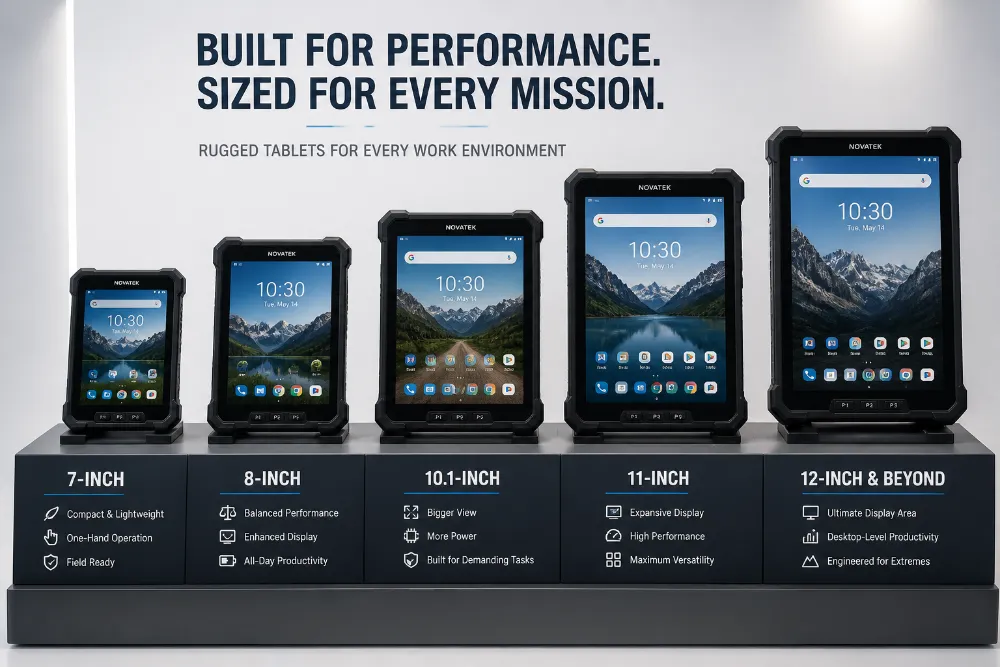

The Standard Industrial Class (10” to 10.1”)

The 10.1-inch widescreen (16:10 aspect ratio) is the “Goldilocks” zone of the industry. It balances enough screen real estate for complex apps with a form factor that can still be mounted in vehicles or carried in a shoulder strap.

  • Best For: Field service, construction, and public safety.

The Large Screen Class (11.6” to 14”)

These are the powerhouses meant to replace laptops. They often feature higher resolutions and are designed for “stationary mobile” work — tasks performed at a site but not necessarily while walking.

  • Best For: GIS mapping, CAD viewing, and diagnostic imaging.

Frequently Asked Questions (FAQ)

What is the most popular screen size for rugged tablets?

The 10.1-inch screen is the industry standard due to its balance of screen space and portability. It is widely supported by third-party mounting manufacturers like RAM Mounts and Gamber-Johnson.

Does a larger screen mean a more fragile tablet?

Technically, a larger surface area of glass is more vulnerable to impact. However, high-quality rugged tablets compensate for this with thicker Corning Gorilla Glass and internal magnesium alloy mid-frames. Always check the MIL-STD-810H drop rating regardless of size.

How does screen size affect sunlight readability?

Screen size doesn’t directly affect readability, but Luminance (Nits) does. However, larger screens generate more heat when running at high brightness (e.g., 1000+ nits). Ensure your large-screen tablet has excellent thermal management if used in direct sunlight.

Can I use a 7-inch tablet for vehicle navigation?

Yes, but with caution. While 7-inch tablets are great for not obstructing the view, the text may be too small to read safely while driving. 8-inch to 10-inch tablets are generally preferred for ELD (Electronic Logging Device) applications.

Does screen size impact the IP rating?

No. Whether it is 7 inches or 13 inches, a tablet can be rated IP65, IP67, or IP68 (water and dust resistance). The size of the screen does not limit the sealing capabilities of the chassis.

https://www.waysion.com/blog/choosing-right-screen-size-rugged-tablet/

评论

此博客中的热门博文

Mobile Device Management Solutions: The 2025 Buyer’s Blueprint

  Mobile device management solutions   (MDM) have moved from “nice-to-have” to mission-critical as hybrid work, BYOD, and rugged IoT fleets explode. Gartner pegs 2025 endpoint growth at 18 % YoY; cyber-insurance carriers now demand MDM coverage before underwriting policies. What Are Mobile Device Management Solutions? Mobile device management solutions  are cloud or on-prem platforms that provision, configure, secure, and retire smartphones, tablets, laptops, and rugged gear at scale. Core modules: Enrollment  – zero-touch, BYOD, Apple Business Manager, Android zero-touch. Policy engine  – passcode, encryption, kiosk, COSU, single-app mode. App lifecycle  – silent install, VPP, managed Google Play, update rings. Security stack  – remote wipe, lock, compliance rules, threat intel feeds. Visibility  – hardware inventory, SIM swap alert, data usage, certificate expiry. Off-boarding  – enterprise wipe, device retirement, e-waste certificate. Mode...

What is a Mobile Data Terminal (2024)?

  In today’s fast-paced, technology-driven world, businesses and organizations rely heavily on efficient data management systems. One such system that has revolutionized various industries is the   Mobile Data Terminal (MDT) . But what exactly is a Mobile Data Terminal, and why is it so crucial? Table Of Contents What is a Mobile Data Terminal? Importance of Mobile Data Terminals History and Evolution Early Development Modern Advancements Components of a Mobile Data Terminal Hardware Components Software Components Types of Mobile Data Terminals Fixed-Mount Terminals Portable Terminals Key Features and Capabilities Real-time Data Access GPS Functionality Communication Capabilities Applications in Different Industries Public Safety Transportation Healthcare Field Service Management Benefits of Using Mobile Data Terminals Efficiency Improvement Cost Reduction Enhanced Communication Challenges and Considerations Security Concerns Maintenance and Upgrades User Training Future Trend...

Enhancing Forklift Safety with the WAYSION Q777 Rugged MDT

  The Hidden Risks of Forklift Operations Forklifts are the backbone of modern warehouses, manufacturing sites, and logistics hubs. Yet, they also account for a significant share of workplace accidents, often caused by limited operator visibility, blind spots, and delayed communication. Traditional safety tools—mirrors, buzzers, or standalone cameras—often fail to provide operators with the real-time situational awareness they need. With warehouses under constant pressure to improve efficiency and reduce downtime, the need for integrated safety and monitoring systems has never been greater. The Role of Rugged MDTs in Forklift Safety A rugged  Mobile Data Terminal (MDT)  acts as the central interface for drivers and supervisors, consolidating video, telematics, and dispatch information into a single reliable platform. Unlike consumer-grade tablets, rugged MDTs are designed to withstand the dust, vibration, and temperature variations common in warehouse environments. Q777: ...