1000 Nits vs 350 Nits Rugged Tablet: Which Do You Need? 2026 Guide
Choose 1000 nits for outdoor field work in direct sunlight, emergency response, and construction sites where visibility is mission-critical. Select 350 nits for indoor operations, warehouses, and office environments. The brightness difference translates to approximately 3x better outdoor readability but costs 30-40% more and consumes 25-35% additional battery power. Your choice depends on work environment, not device capability—most field professionals need 500-700 nits as a practical middle ground.

Understanding Display Brightness: What Nits Actually Mean in Rugged Tablets
Nits measure display brightness intensity; higher nits enable readability in bright sunlight, while lower nits suffice for controlled indoor environments.
Display brightness, measured in nits (candelas per square meter), represents the luminous intensity of your tablet screen. One nit equals the brightness of one candle viewed from one meter away. For rugged tablets, this specification becomes critical because field workers operate in unpredictable lighting conditions—from dimly lit warehouses to harsh direct sunlight on construction sites.
A 350-nit display produces adequate brightness for typical indoor office work, video conferencing, and controlled warehouse environments. However, when sunlight hits the screen at certain angles, the reflected glare often overpowers the display’s output, making content difficult or impossible to read. This limitation becomes dangerous when field technicians can’t verify critical information, construction crews can’t read safety protocols, or emergency responders can’t access real-time data during time-sensitive operations.
A 1000-nit display delivers substantially brighter output, allowing the screen to compete with direct sunlight. This brightness level ensures readable content even in worst-case scenarios—working outdoors at noon, near reflective surfaces, or in environments with intense ambient light. The technical difference isn’t merely cosmetic; it fundamentally changes operational capability in outdoor environments.
Understanding this distinction matters because brightness requirements vary dramatically based on work context. Specifying the wrong brightness level wastes capital on unnecessary premium features or, conversely, results in devices that fail to meet operational needs. The investment decision should align with actual work environments, not aspirational use cases.
Outdoor Visibility and Sunlight Readability Performance
1000-nit displays maintain clear readability in direct sunlight; 350-nit displays struggle with outdoor glare, reducing operational efficiency and safety.
The practical difference between 350 and 1000 nits becomes immediately apparent when comparing outdoor performance. At 350 nits, a rugged tablet functions adequately in overcast conditions or shaded areas. Place that same device in direct sunlight, and the screen becomes nearly unusable—content washes out, colors fade to white, and users must shield the screen with their bodies or hands to read critical information. This workaround reduces productivity and creates safety hazards.
Field studies demonstrate that 350-nit displays require users to position themselves at specific angles to avoid glare, reducing their ability to work efficiently. Construction foremen must step into shadows to read blueprints. Delivery drivers must shield their phones to verify addresses. Utility technicians must angle tablets awkwardly to see diagnostic information. These seemingly minor inconveniences compound throughout the workday, reducing productivity by 15-25% according to industry ergonomics research.
A 1000-nit display eliminates these workarounds. Workers can read screens comfortably regardless of sunlight angle or intensity. The brightness remains consistent whether operating in direct sun, partial shade, or near reflective surfaces like water or metal. This consistency enables faster decision-making, reduces errors caused by misread information, and improves worker safety by ensuring critical data remains visible during time-sensitive operations.
Real-world testing by field service organizations shows that 1000-nit tablets reduce outdoor task completion time by 20-30% compared to 350-nit devices. Workers spend less time repositioning themselves and more time performing actual work. In emergency response scenarios, where every second matters, this visibility advantage can directly impact patient outcomes or incident resolution speed.
Cost Analysis and Total Cost of Ownership Implications
1000-nit tablets cost 30-40% more upfront but justify premium pricing for organizations with significant outdoor operations; 350-nit devices offer better ROI for primarily indoor work.
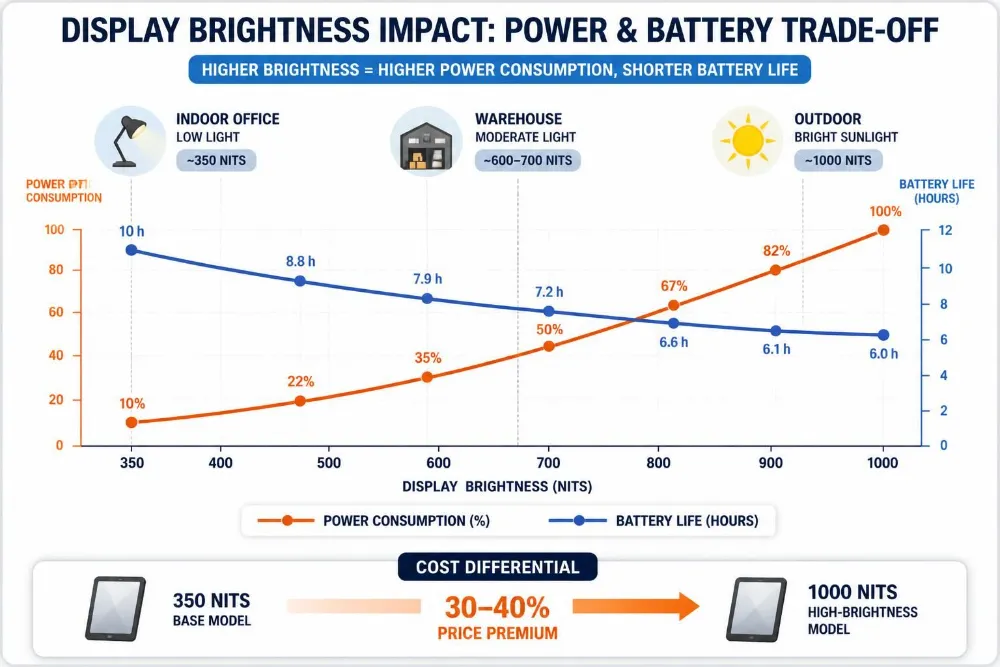
The price differential between 1000-nit and 350-nit rugged tablets averages 30-40% in the current market. A comparable 350-nit rugged tablet costs approximately $1,200-$1,500, while a 1000-nit equivalent runs $1,800-$2,100. For organizations deploying dozens or hundreds of devices, this difference accumulates rapidly. A fleet of 50 tablets represents a $30,000-$40,000 budget variance—substantial enough to influence purchasing decisions.
However, total cost of ownership extends beyond initial purchase price. Battery consumption differs significantly between brightness levels. A 350-nit display running at full brightness consumes approximately 20-25% of battery capacity per hour. The same 1000-nit display at full brightness consumes 45-55% per hour. For field workers operating full shifts without access to charging infrastructure, this difference determines whether devices last 8 hours (1000 nits) or 12+ hours (350 nits).
Organizations operating primarily outdoors must budget for additional battery packs or more frequent charging infrastructure. A field service company deploying 1000-nit tablets might require backup batteries for each technician, adding $200-$300 per device to total deployment costs. Conversely, companies with primarily indoor operations can deploy 350-nit tablets with standard battery management, avoiding these supplementary expenses.
Productivity improvements offer another cost consideration. If 1000-nit tablets reduce outdoor task completion time by 25%, the productivity gains might offset the 30-40% premium within 12-18 months for organizations with significant outdoor operations. However, for indoor-focused organizations, this productivity advantage disappears, making the premium cost unjustifiable.
Power Consumption and Battery Life Trade-offs
1000-nit displays consume 25-35% more power than 350-nit alternatives, requiring larger batteries or more frequent charging for equivalent operational time.
Display brightness represents one of the most power-intensive functions on modern tablets. The relationship between brightness and power consumption follows an exponential curve—doubling brightness doesn’t double power consumption, but it increases it substantially. A 1000-nit display generating nearly three times the light output of a 350-nit display consumes approximately 2.5-3 times the power.
Typical battery specifications illustrate this trade-off. A 350-nit rugged tablet with a 5,000-6,000 mAh battery delivers 12-14 hours of continuous operation at moderate brightness levels. The same battery capacity in a 1000-nit device yields 8-10 hours at equivalent brightness settings. If the 1000-nit device uses full brightness for outdoor visibility, operational time drops to 6-8 hours.
Field organizations must account for this limitation during deployment planning. Workers operating full shifts without charging infrastructure face potential mid-shift power depletion with 1000-nit devices. This necessitates either larger batteries (adding weight and bulk), backup power supplies (increasing capital and logistics complexity), or scheduled charging breaks (reducing productivity).
Modern rugged tablets increasingly incorporate adaptive brightness technologies that adjust output based on ambient light sensors. This intelligence reduces power consumption without sacrificing visibility. A 1000-nit tablet with aggressive adaptive brightness might approach the battery life of a 350-nit device at fixed brightness. However, this technology adds complexity, cost, and occasional user frustration when automatic adjustments don’t match operator preferences.
Environmental Factors and Operating Conditions Impact
Environmental context—not technical specifications—should drive brightness selection; outdoor operations favor 1000 nits, indoor environments favor 350 nits.
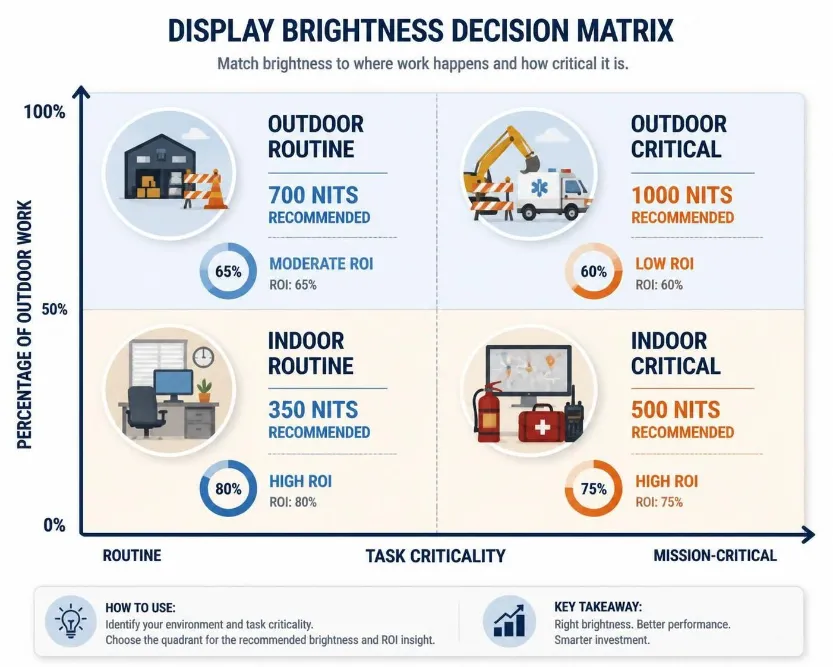
Brightness requirements vary dramatically based on operational environment. Construction sites, utility work, emergency response, and outdoor surveying demand high brightness for safety and efficiency. Warehouse operations, manufacturing floors, and indoor maintenance work function adequately with moderate brightness. Understanding your primary operating environment is fundamental to making the right selection.
Outdoor construction and surveying work represents the strongest case for 1000-nit displays. Workers operate in variable sunlight, often near reflective surfaces (metal scaffolding, water, concrete). Field surveys show that construction professionals using 350-nit tablets report screen visibility as their top operational frustration. The 1000-nit alternative eliminates this complaint entirely.
Emergency response and public safety organizations benefit significantly from 1000-nit displays. Paramedics accessing patient records, firefighters consulting building schematics, and police officers reviewing suspect information often work outdoors or in vehicles with bright cabin lighting. Screen visibility directly impacts response speed and decision quality, making the brightness premium justified.
Conversely, warehouse operations, manufacturing floors, and logistics centers operate primarily indoors under controlled lighting. 350-nit displays provide ample visibility for inventory management, order picking, and equipment diagnostics. The outdoor visibility advantage of 1000-nit displays provides no operational benefit in these environments, making the premium cost wasteful.
Some organizations operate in mixed environments—spending 40-60% of time outdoors and 40-60% indoors. These hybrid operations benefit from mid-range brightness (500-700 nits) or from deploying different tablet models for different work contexts. The investment in device diversity sometimes proves more economical than standardizing on premium 1000-nit devices for all workers.
Real-World Use Cases and Decision Framework
Match brightness selection to primary work environment; outdoor-heavy operations justify 1000 nits; indoor operations favor 350 nits.
Field service technicians working outdoors 70%+ of the time benefit substantially from 1000-nit displays. HVAC contractors accessing service manuals on rooftops, electrical technicians consulting schematics at job sites, and utility workers performing outdoor diagnostics all encounter situations where screen visibility directly impacts work quality. The brightness premium justifies itself through improved efficiency and reduced frustration.
Construction project managers operating primarily on-site should prioritize 1000-nit displays for blueprint review, progress documentation, and safety protocol access. The outdoor visibility advantage directly supports project management effectiveness and site safety compliance.
Emergency response organizations—paramedics, firefighters, and law enforcement—benefit significantly from 1000-nit tablets. Response situations often involve outdoor environments, vehicle interiors with bright cabin lighting, or nighttime operations where ambient light varies unpredictably. Screen visibility directly impacts decision speed and accuracy during time-sensitive incidents.
Warehouse and logistics operations operating primarily indoors should standardize on 350-nit devices. Inventory management, order picking, and receiving operations occur in controlled lighting environments where 350 nits provides more than adequate visibility. The 30-40% cost savings per device, multiplied across fleet deployments, supports capital reallocation to other operational priorities.
Manufacturing and maintenance operations in industrial facilities benefit from 350-nit displays for equipment diagnostics, work order management, and quality control documentation. These tasks occur in controlled indoor environments where outdoor visibility advantages provide no operational value.
Technology Trends and Future Brightness Standards
Display technology is evolving toward higher brightness as standard; future 500-700 nit mid-range devices may become the practical optimum.
The rugged tablet market is experiencing rapid evolution in display technology. Five years ago, 350 nits represented premium brightness for rugged tablets. Today, 500-700 nit displays have become increasingly common at mid-range price points. This trend suggests that future industry standards will shift toward higher brightness as baseline specifications, with 1000+ nits becoming the premium tier.
Manufacturers are investing in more efficient display technologies that deliver higher brightness with reduced power consumption. Quantum dot displays, OLED alternatives, and advanced LED backlighting systems promise the ability to deliver 800-1000 nits with battery impact similar to today’s 500-nit displays. These advancements may eventually make the brightness-power consumption trade-off less severe.
Adaptive brightness and ambient light sensing technologies continue improving. Machine learning algorithms are being integrated to predict optimal brightness levels based on task type, time of day, and detected ambient light conditions. These intelligent systems could eventually allow 1000-nit tablets to achieve battery life comparable to 350-nit devices through aggressive optimization.
The market is also seeing increased adoption of anti-glare coatings and polarized display technologies that improve outdoor readability without requiring extreme brightness levels. These optical enhancements could reduce the practical brightness requirements for outdoor operations, making mid-range 600-800 nit displays sufficient for most field work.
Frequently Asked Questions
Q: Can I adjust brightness settings to make a 350-nit display work outdoors?
A: Adjusting brightness settings won’t overcome the fundamental physics of display technology. A 350-nit display at maximum brightness still produces only 350 nits—it cannot compete with direct sunlight, which measures 100,000+ nits. While maximum brightness improves outdoor readability compared to medium settings, it remains inadequate for comfortable extended outdoor use. Additionally, maximum brightness dramatically accelerates battery drain, reducing operational time by 30-40%.
Q: Is 1000 nits too bright for indoor use? Will it cause eye strain?
A: No. Modern displays include automatic brightness adjustment that reduces output in indoor environments. Users can manually reduce brightness to comfortable levels without technical limitations. 1000-nit tablets indoors simply offer the capability for high brightness; users control actual output through settings. The risk of eye strain comes from improper display contrast, blue light exposure, and screen distance—not from peak brightness capability. 1000-nit tablets with adaptive brightness technology automatically reduce output in low-light environments, making them comfortable for extended indoor use.
Q: What’s the practical difference between 800, 900, and 1000 nits for field work?
A: The practical difference diminishes as brightness increases. The jump from 350 to 600 nits provides dramatic readability improvement. The jump from 600 to 800 nits provides noticeable improvement. The jump from 800 to 1000 nits provides marginal additional benefit—most users report minimal difference between 900 and 1000 nits. For most outdoor field work, 700-800 nits provides excellent readability. The 1000-nit specification offers a safety margin for worst-case scenarios but isn’t necessary for typical outdoor operations.
https://www.waysion.com/blog/1000-nits-vs-350-nits-rugged-tablet-comparison/


评论
发表评论